

Before you start
Connect DataScaler to your company's own Feishu or Lark custom app, or WeCom smart bot, to receive brand insights and ask questions in a bot direct message. Check the prerequisites and your platform first.
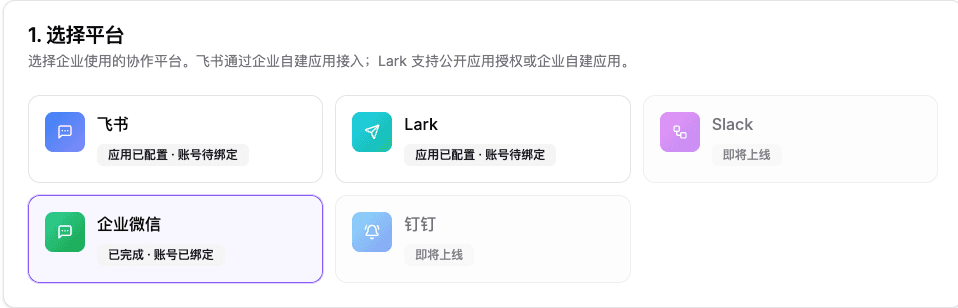
DataScaler connects to Feishu or Lark through an enterprise custom app, and to WeCom through a smart bot. WeCom users should go straight to WeCom integration; the rest of this page and steps 1–3 are the Feishu / Lark flow. Once set up, you can receive brand insights and ask brand questions in a direct message with your company's own bot, including rich text and interactive cards. No coding or server is required.
Setup flow
For first-time setup, complete these 3 steps in order. Each step has its own page:
| Step | What you do | Time |
|---|---|---|
| 1. Create and configure the app | OA1–OA5: create the app, enter credentials, enable permissions, configure the message event and card callback | 20–30 minutes |
| 2. Publish and bind your account | OA6–OA8: submit the release, wait for administrator approval, bind your account in DataScaler and check it works | 10 minutes, plus approval time |
| 3. Add recipients (optional) | OA9: get bot access approved, invite colleagues to bind and receive updates | About 5 minutes per person |
Already have a custom app and only want to add colleagues? Go to Add recipients. For errors, see Troubleshooting.
Prepare these 4 things
- A completed VOC brand report that you can open. If you do not have one, create your first brand and wait for analysis to finish.
- The DataScaler account that created the brand. Access to a shared report alone does not let you configure its bot connection.
- A Feishu (enterprise or personal edition) or Lark account, and permission to create and manage custom apps. On a company account, ask your enterprise administrator for help if needed.
- Your enterprise administrator's help. Publishing requires administrator approval. New users outside the app's availability range also need approval to use the bot.
Use a computer and allow 30–45 minutes, plus administrator approval time. Keep your DataScaler report and developer console open in separate tabs.
Choose your platform first
Use your company's platform throughout. Feishu and Lark have different consoles; their accounts, App IDs and secrets are not interchangeable, and a WeCom bot only works with WeCom.
I use Feishu (mainland China)
Open the Feishu developer console with your company Feishu account. Select Feishu in DataScaler and follow the instructions labelled Feishu.
I use Lark (international)
Open the Lark Developer Console with your company Lark account. Select Lark in DataScaler and follow the instructions labelled Lark.
I use WeCom
No custom app, release or review is needed. Create an “API mode · long connection” smart bot in the WeCom admin console and enter its Bot ID and Secret in DataScaler, about 15–20 minutes. Select 企业微信 (WeCom) in DataScaler, then follow WeCom integration.
How to read these steps
Unlabelled steps apply to both platforms. Menu translations may vary; use field names and identifiers to confirm your selection. Screenshots use the Chinese DataScaler interface.
When you are ready, Feishu / Lark users continue to Step 1: Create and configure the app; WeCom users continue to WeCom integration.